Lucid Sinhala
Wijesekara Keyboard
Windows සඳහා ලුසිඩ් සිංහල විජේසේකර යතුරු පුවරුව
Type Unicode Sinhala in Word, Chrome, WhatsApp, Facebook, or any Windows app, with the standard Wijesekara layout you learned on the typewriter.
Why use it
Lucid Sinhala is a small tray app that works the same way as the Wijesekara keylayout on a Mac.
Real Wijesekara layout
The same key positions as the SLS 1134 Wijesekara keyboard and Sinhala typewriters.
Typewriter order
Type kombuva (ෙ) before the consonant. The app puts the letters in the correct Unicode order for you.
Works everywhere
Output is standard Unicode, so it works in documents, browsers, chat apps, and on social media.
Private and offline
Everything runs on your PC. The app never connects to the internet or records what you type.
One-key switching
Click the tray icon or press Ctrl+Alt+Space to switch between Sinhala and English.
No installation
A single file. Download it and run it. It can start with Windows if you want.
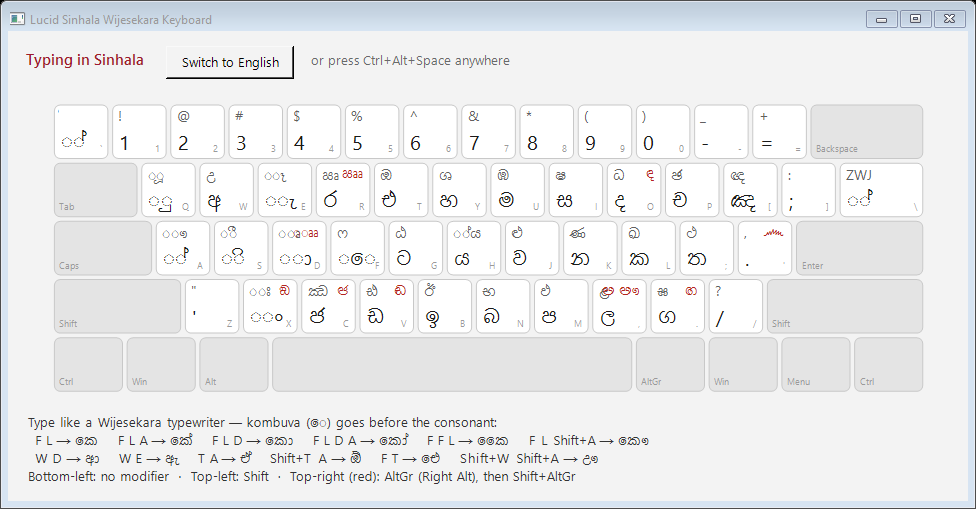
Keyboard layout: try it here
Click inside the box and type on your keyboard, or tap the keys below. This demo follows the same rules as the Windows app.
Typing guide
As on a typewriter, type the kombuva (ෙ, the F key) before the consonant. Vowels such as ආ ඇ ඒ are made from two keys.
| Keys | Result |
|---|---|
| F L | කෙ |
| F L A | කේ |
| F L D | කො |
| F L D A | කෝ |
| F F L | කෛ |
| F L Shift+A | කෞ |
| F L ` | ක්රෙ |
| F M Shift+H | ප්යෙ |
| Keys | Result |
|---|---|
| W D | ආ |
| W E | ඇ |
| W Shift+E | ඈ |
| T A | ඒ |
| Shift+T A | ඕ |
| Shift+T Shift+A | ඖ |
| F T | ඓ |
| Shift+W Shift+A | ඌ |
AltGr is the Right Alt key. For example, AltGr+O → ඳ, AltGr+. → ඟ, AltGr+V → ඬ, AltGr+X → ඞ, AltGr+C → ඦ.
Install and use
It takes about a minute. No administrator rights are needed.
- Download
LucidSinhalaKeyboard.exeand move it to a permanent folder, for exampleDocuments\Lucid Sinhala. - Double-click it. If Windows shows “Windows protected your PC”, click More info → Run anyway. The warning appears because the app is new and isn't code-signed yet. It doesn't mean the file is harmful.
- A red සි icon appears in the system tray, near the clock. Start typing in any app.
- Switch languages by clicking the icon or pressing Ctrl+Alt+Space. The icon shows EN while you type English.
- Right-click the icon for the keyboard layout chart, Start with Windows, and Exit.
To uninstall, right-click the tray icon, turn off Start with Windows, choose Exit, and then delete the file.
Frequently asked questions
Is it free?
Yes. It's free for personal, educational, and commercial use. See the Terms of Use.
Does it record or send what I type?
No. To change your key presses into Sinhala, the app has to see them, but it handles them only on your PC and keeps nothing after each key. The app has no internet features at all. See the Privacy Policy.
My antivirus flagged it. Why?
Keyboard apps work by watching key presses system-wide, which is also what some malicious programs do, so some antivirus tools are cautious about them. Only download the app from sinhala.lucidgrammar.com. Copies from other websites may have been changed.
It doesn't type into some programs.
Windows blocks normal apps from typing into programs that run as administrator. If you need that, right-click the app and choose Run as administrator.
Do I need a Sinhala font?
No. Windows 10 and 11 include Sinhala fonts (Nirmala UI and Iskoola Pota), so the text displays correctly everywhere.
Is there a Mac version?
For macOS, use the excellent mac-wijesekara keyboard layout by Dasun Sameera Weerasinghe. Lucid Sinhala's layout is based on it.